How to be Honest with Data

And outsmart those who try to mislead you!

Recently I shared a series of posts on LinkedIn about staying honest when presenting data. Here’s a slightly deeper dive into what I shared and learned from the comments of fellow readers.

Be clear what you’re comparing to

“Senior Citizens in Atlanta are more likely to have poor access to transit.”

Piedmont Park in Atlanta. Photo by Kyle Sudu on Unsplash

It’s common to hear this type of comparison made to support a claim, but it’s misleading because on its own it doesn’t tell us enough information. You could interpret this in one of several distinct ways:

  • Seniors in Atlanta are more likely than seniors in other cities to have poor access to transit.
  • Seniors in Atlanta are more likely than people of other age groups to have poor access to transit.
  • Seniors in Atlanta are more likely to have poor rather than good access to transit.

These statements all mean somewhat different things and without more information, we can’t be sure what the speaker meant. Clarification will help reduce any misunderstandings. By the way, at least the first statement is true, according to a Transportation for America report documenting a growing problem of people aging in place in communities that lack good transit access.

Normalize Your Data with Caution

When you report data, you often need to normalize it: report it as a rate per capita, for example. But what you normalize it by is an important decision that can lead to very different outcomes.

In the post comments, a Bay Area acquaintance and I discussed how you should normalize the number of visitors to Golden Gate Park in San Francisco. It’s more difficult than it sounds, because normalizing by the number of residents ignores tourists who visit there, and anyway, which neighborhoods do you include in your population count?

Golden Gate Park. Photo by Jeffrey Eisen on Unsplash

I suggested that it depends on the context. In some cases, you don’t need to normalize – it’s not inaccurate to just say that Golden Gate Park has 12.4 million visitors per year. How you should normalize depends on what comparisons you are trying to draw. If you want to compare the popularity of Golden Gate Park to a park in a Bay Area suburb that fewer people have the chance to visit, it would be reasonable to normalize based on some combination of city residents and annual visitors to the city. If you want to compare it to a smaller park in San Francisco, you might want to normalize based on park acreage since the other park simply cannot hold as many people and does not touch as many neighborhoods.

Watch the Y-Axis

There are few easier ways to lie with data than by truncating the y-axis on a graph. Consider the following:

Same data, two different impressions.

The graphs look very different, but the underlying data is the same. Someone who wanted to suggest that trail usage was growing very fast might opt for the first one, but that would be misleading. The bottom graph, though less exciting, is a more honest way to represent what’s going on. When in doubt, think about if the trend were reversed and usage went down: Would you be so keen to zoom in on the differences then?

This is up for some debate. Seth Long makes a compelling argument that whether you truncate depends on if the difference you’re representing is significant in your particular context. This may be true for certain audiences, but most readers will not read carefully enough to understand that nuance, even if they are very educated and warned about y-axis truncation in advance, so I still think that truncations should be very limited.

Give Context to Trends

The last tip refers to the way we report data that changes over time. When you are reporting a trend, be clear about the timeline you are referring to and don’t selectively report just the time period that makes you look good.

If bus on-time performance has been been on the decline for 10 months but it’s still higher than it was at this time last year, you should give that full context and not merely say that it’s up. Or if last month finally saw a drop in bike thefts after a year of climbing, be clear that the reversal is recent. An easy way to spot a red flag with this type of data is when a politician at election time reports favorable numbers from the last three months and not their full term.

“Bike share enrollments are up” is only true in a very limited timeframe.

This report from the New York Times has great visualizations and shows how this technique is often manipulated to support partisan politics.

Wrapping it Up

What else do you find misleading when looking at data? Have you caught yourself lying with charts by accident? I’d love to hear your stories and other common pitfalls you think we should watch out for.

Tips on Communicating Data

I was at a conference recently where thousands of the brightest minds in transportation presented their research over the course of four days. I walked away with some great nuggets of wisdom and had stimulating conversations. On the other hand, I had a hard time following the main thread of some presentations or understanding how to apply them to my work. Maybe it was my jetlag, but it was hard to fully appreciate what they had done. I wanted these folks who worked very hard on their research to be able to share their work with the world.

I’ve come to believe that your analysis is only as good as your ability to communicate it. Data communication and presentation doesn’t get as much air time as sexy new machine learning algorithms, but boy are there some smart studies out there that never get used because nobody understands them.

Photo by AllGo – An App For Plus Size People on Unsplash

With that, here are some tips I’ve come up with for communicating your data more effectively.

Start with Why

One of the most applicable books I’ve ever read, Start with Why by Simon Sinek, makes the case that you must lead off your presentation/memo/report with your motivations if you want people to stick around. In fact, that’s what I did in this blog post. Sell the audience on the importance of the problem you’re trying to solve. If they can relate, they’ll want to know how you propose to solve the problem.

I gave a presentation at this conference about a dashboard I built to visualize US Census demographic data for Sound Transit. (More about that, and the Transit Data Challenge, in my next post!) I stated the problem outright: We needed demographic data but staff didn’t know where to find it or how to best use it.

One of my early slides painted the picture of life pre-dashboard: total chaos!

But then I realized that even that wasn’t enough: Why did we need demographic data? I went a step further and explained that we need to build an equitable transit system and avoid further harm to historically disadvantaged communities, and to do that, we need to know who they are.

By setting the stage with a relatable problem, I could now introduce my tool as the ideal answer to this problem.

Tailor the Language to Your Audience

Photo by @alyssasieb on Nappy

Let’s say you’re making cupcakes for a friend’s birthday. It would really be too bad if you forgot that your friend is gluten-free or hates chocolate. The same thing happens when you use jargon and acronyms your audience doesn’t understand. In my interview for the role I recently started, I mentioned that I had done a cluster analysis of passenger data at Sound Transit. I had done my research so I knew there were data scientists on the panel who would know what that was, but there were also transportation planners who might not. Always prioritize the non-experts in the group; it’s the most inclusive.

I simply said, “If you’re not familiar, clustering is a technique that looks for groups of observations with similar characteristics based on criteria that you define.” I think this quick explanation respected that the audience were smart, educated people who have different expertise than I do.

Learn the Basics of Data Visualization

Once you’ve established the why and the who, you’ll actually bake the cake, so to speak – but don’t just go with the first sponsored recipe ad that Google returns. In the same way, before you just slap in any old chart that Excel auto-generated, learn a few tips about data visualization that can have powerful impacts on your charts. There are many blogs on the topic, and I also love the book Good Charts: The HBR Guide to Making Smarter, More Persuasive Data Visualizations. The tip I live by the most is to eliminate as much as possible from my charts.

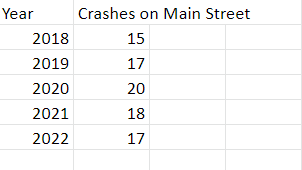
For example, let’s take some fictional crash data from Main Street, USA. Here’s the data in Excel and the unedited Excel output.

Not terrible, but here it is with a few tweaks.

Which is easier to read?

I made just four tweaks for this:

  • I labelled the data directly so that the reader’s eyes don’t have to go back and forth to the y-axis to determine exact numbers.
  • With data labelled, I can also delete the y-axis data labels, but I do add an axis title that says what exactly the numbers represent.
  • Without y-axis labels, I don’t need gridlines.
  • I changed the chart title to something that summarizes the point I’m trying to make.

Present it Well

Nobody buys a cupcake without frosting.

Photo by Jr R on Unsplash

The less technical your audience, the more important it is to make your final product visually appealing. We’ve all been spoiled in the age of “graphic awesomeness” (as I once heard a focus group participant call it), and something that is laden with text and formulas will often deter people who never quite loved math.

If you don’t have a graphic design department at your disposal, here are a few tools that can help you fake it. They are like fondant but less gross. If you are creating a slide deck, I am partial to the slide templates available at SlidesGo, and Google Slides has some good ones as well. They offer a wider variety of slide types within each theme compared to the built-in Power Point templates, which feel a little stale. Then incorporate good visuals. I am a huge fan of the free vector art available at Storyset – pick a visual theme and a color scheme that matches your slide templates and go to town.

Here is a slide I created for my presentation to introduce an example of how my tool applies to practice.

If you’d rather use photos, here are some interesting and diverse sources of stock photos that are free with attribution:

  • Can We All Go – Photos all featuring plus-size people in office, home, and swim settings. The collection is limited but growing.
  • Nappy: Photos of Black and Brown people in a variety of settings.
  • Unsplash: general source of stock photos.

You’ve worked hard on your analysis, and it deserves to be appreciated. Don’t blow it! Take some time to think about how you’ll communicate it, which is just as important as the technical work itself. And when you do, celebrate with a cupcake.

Working with Census data has never been easier

tidycensus, the R package you didn’t know you needed

This is a post for R nerds or people who don’t know why they should become R nerds but are willing to be convinced.

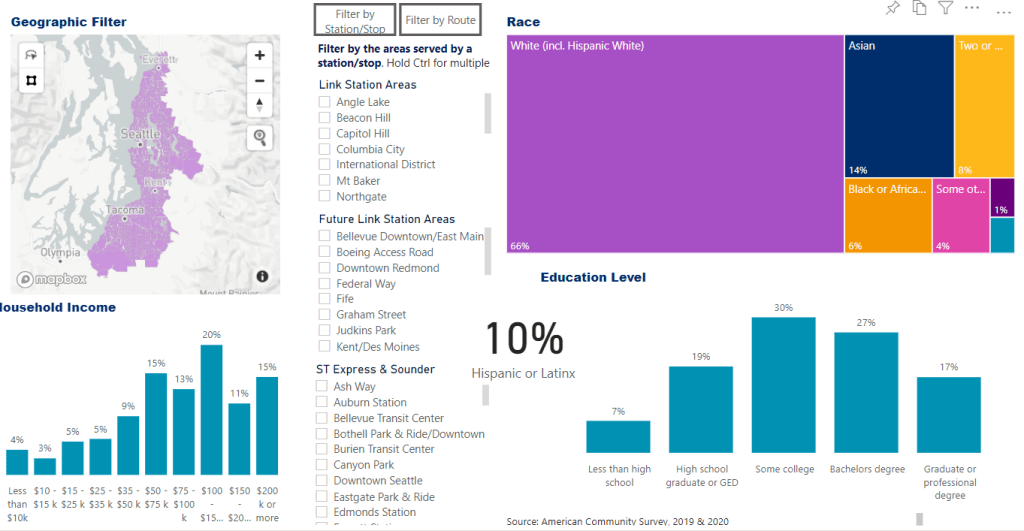
In my job I have worked with a lot of Census and American Community Survey data. I built a PowerBI dashboard to visualize the demographics of people living in the region we serve. This allowed for very quick, easy visualizations of the Puget Sound region, such as the languages spoken, race and income, and number of jobs. The data feeding these dashboards is stored in Excel spreadsheets.

An excerpt of my Census dashboard.
An example of an underlying dataset in PowerBI for ratio of income to poverty level.

Previously, this is how I went about creating these datasets:

  1. Go to data.census.gov and find the table with the data I want.
  2. Tab through a list of possible geographies and select the three counties I wanted data for and the year. Repeat for multiple years.
  3. Download the Excel file.
  4. Spend a few hours reformatting the sheet to a format that would work with PowerBI, calculating new columns, renaming columns, and changing data types.
  5. Repeat this for all 15 or so tables I use in the dashboard, forget how I did certain things, and then remember.
  6. Repeat this every year when American Community Survey data is released.

Then a colleague told me about the tidycensus package in R (click for a great tutorial). This package, combined with dplyr, makes it possible to do all of the above in a number of seconds without ever visiting the Census website.

Here’s an example of how tidycensus fetches ACS data for three counties I specify:

library(tidycensus)
df = get_acs(geography = "tract", table = "S1901", cache_table = TRUE, year = 2020, state = 53, county = c(33, 61, 53), key = key)

You can retrieve ACS data for the exact geographies, years, and tables you need, over and over again. Do this once and updates from now on will be a breeze.

Try it out by requesting an API key at https://api.census.gov/data/key_signup.html and running the above code in R.

View my complete scripts in Github!