tidycensus, the R package you didn’t know you needed
This is a post for R nerds or people who don’t know why they should become R nerds but are willing to be convinced.
In my job I have worked with a lot of Census and American Community Survey data. I built a PowerBI dashboard to visualize the demographics of people living in the region we serve. This allowed for very quick, easy visualizations of the Puget Sound region, such as the languages spoken, race and income, and number of jobs. The data feeding these dashboards is stored in Excel spreadsheets.
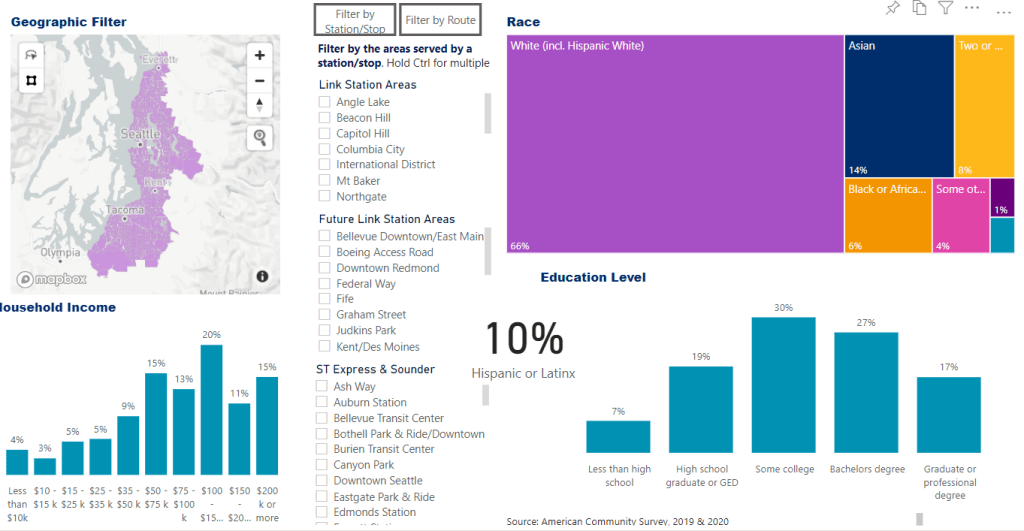

Previously, this is how I went about creating these datasets:
- Go to data.census.gov and find the table with the data I want.
- Tab through a list of possible geographies and select the three counties I wanted data for and the year. Repeat for multiple years.
- Download the Excel file.
- Spend a few hours reformatting the sheet to a format that would work with PowerBI, calculating new columns, renaming columns, and changing data types.
- Repeat this for all 15 or so tables I use in the dashboard, forget how I did certain things, and then remember.
- Repeat this every year when American Community Survey data is released.
Then a colleague told me about the tidycensus package in R (click for a great tutorial). This package, combined with dplyr, makes it possible to do all of the above in a number of seconds without ever visiting the Census website.
Here’s an example of how tidycensus fetches ACS data for three counties I specify:
library(tidycensus)
df = get_acs(geography = "tract", table = "S1901", cache_table = TRUE, year = 2020, state = 53, county = c(33, 61, 53), key = key)
You can retrieve ACS data for the exact geographies, years, and tables you need, over and over again. Do this once and updates from now on will be a breeze.
Try it out by requesting an API key at https://api.census.gov/data/key_signup.html and running the above code in R.
View my complete scripts in Github!
 Nerd on the Bus